Static vs. Dynamic SandboxYour Agents Need a Dynamic Sandbox
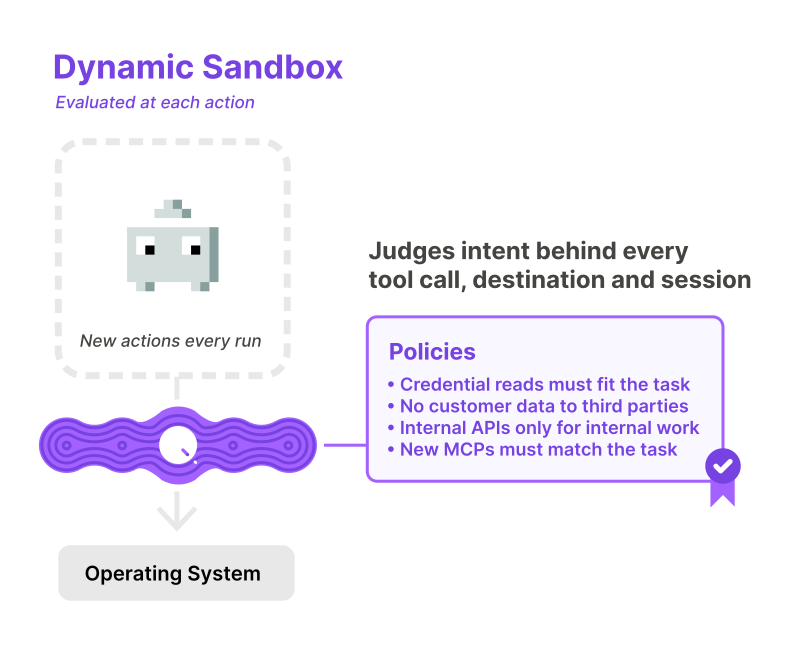
Most sandboxes for AI agents today are static. Your security team writes the rules and policies upfront before an agent runs: which commands an agent can run, which paths can be read, which domains can be reached. This static set of rules sets the guardrails that contain what an agent can do.
This strategy works for traditional software that performs the same set of operations every time. AI agents do not work this way. Ask an agent to fix a failing deploy and it might run Terraform, open ~/.aws/config, install a package, write a helper script, and call three APIs it has never touched before. None of which was planned. The agent decided what actions to take as it went along.
Static rules can’t possibly account for a set of actions that are determined by the agent at runtime. A static sandbox is an access list. It can say which files, commands, and hosts are allowed. It can’t account for unforeseen actions and, critically, it can’t judge intent: why the agent is doing something, and whether the actions taken should be allowed. A dynamic sandbox sees each action in real time, and makes a decision inline, based on the policies set by your security team. That’s what we are building at Qpoint.
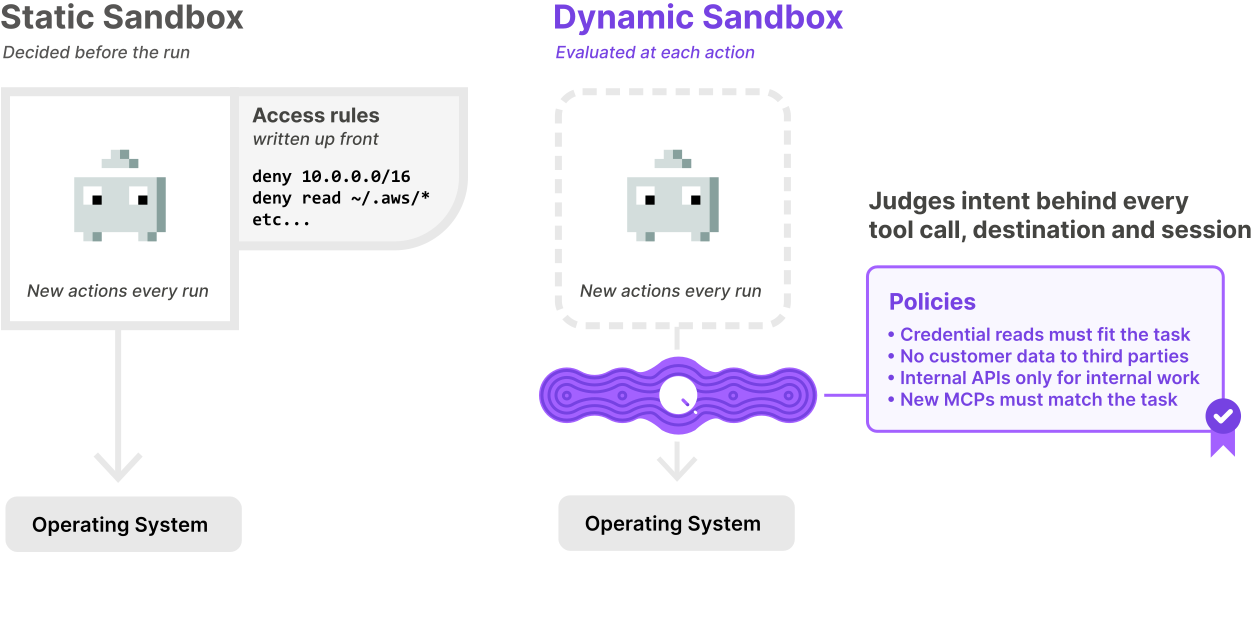
What a static sandbox looks like today
There are a few common approaches, and most teams use a combination of them.
Harness permission settings. Claude Code has allow and deny lists for tools and commands. Codex has sandbox modes. Every harness does it a little differently, and the rules only apply inside that harness.
Harness plugins and hooks. You write code that blocks certain calls in one harness. Then your developers start using Codex, or Cursor, or whatever ships next month, and you start over.
Containers and VMs. The agent runs in a box with a mounted workspace and a fixed egress allowlist.
Network controls. An AI gateway or firewall rule can see the destination for every request, but not which agent sent it or why.
Every one of these approaches is an access list in some form: allow lists, deny lists, egress lists. The decisions get made before an agent runs, based on an assumption about what it’s going to do, and none of them can see an agent’s intent. These assumptions are often wrong in one of two directions. If the rules are too tight, the agent stalls every time it needs a new package registry or API. Developers get permission prompts all day, and eventually someone turns on the skip-permissions flag. If the rules are too loose, the allowlist keeps growing until it isn’t really a boundary anymore. At that point you have a log, not a sandbox.
Agents route around static rules
Here’s a scenario that almost every agent security approach runs into.
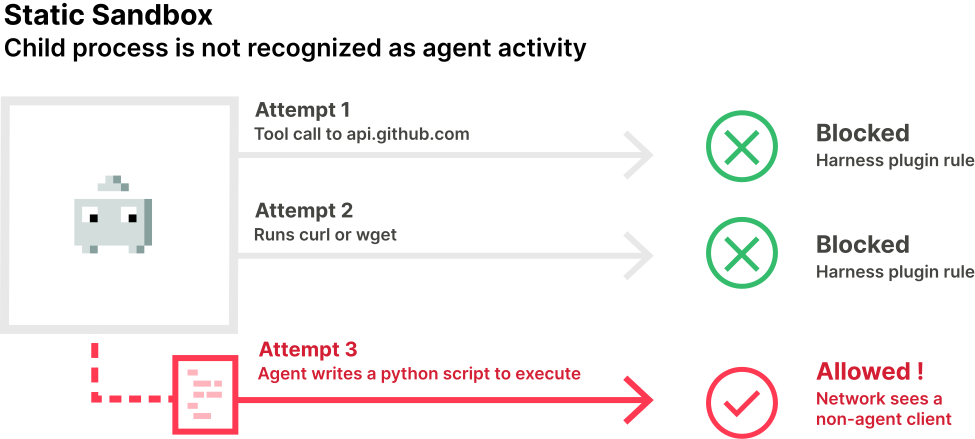
Say you write a plugin for Claude Code that’s supposed to stop the agent from using the GitHub API. The agent makes an HTTPS call to api.github.com, and the plugin says no. Great, problem solved.
Except these models are smart. They’ll go back and try curl, or wget. If those are blocked too, the agent will write a Python script that uses requests in one turn and run it with python3 in the next.
The harness plugin never sees that request, because it didn’t come from a tool call. It came from a Python process. The network just sees a client on the laptop talking to GitHub. Nothing exists that connects the request to the agent that it originated from.
Static rules only cover the paths your security team anticipated. The agent has as many paths as it can come up with, and it’s very good at coming up with them.
We handle this by treating the agent and every process it starts as one surface. When Qpoint taps into an agent session, whether that’s Claude Code or a bash session, anything that happens in it or in one of its child processes is attributed to that agent. So when the agent runs Python, Qpoint sees that. When the Python script opens a connection to GitHub, Qpoint sees that too, and attributes the connection to the agent. A plugin can block it in real time. Or it can tag the traffic with the agent’s ID and profile so the network can make the call. The network becomes agent aware.
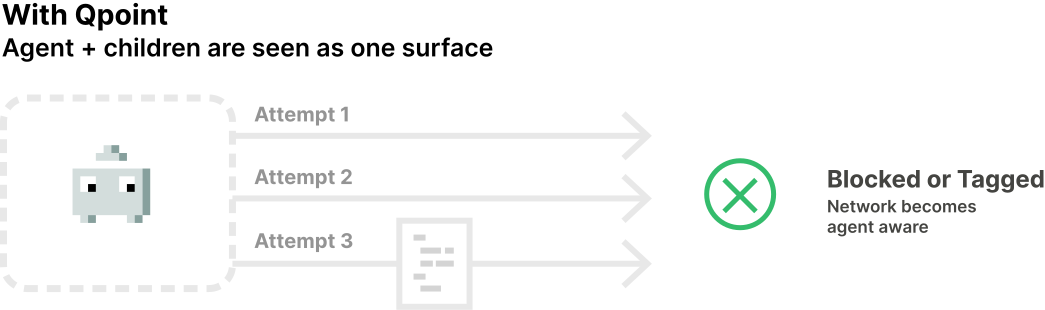
The audit log records all of this under the agent session. An HTTP request shows up as an HTTP request from that agent session, whether the agent made it directly or through a script three processes down. We’ll go deeper on this hidden surface in an upcoming post.
What a dynamic sandbox does
A dynamic sandbox sits in between the agent and the operating system. When Qpoint starts, it surgically inserts a runtime layer between each agent and the underlying OS, based on the rules you set. You don’t modify or run the agent inside anything, change how it starts, or configure anything per agent. The harness runs exactly the way it did before, and is completely unaware that Qpoint has become the I/O surface broker.
An agent only has three ways to act:
- File I/O: reading and writing files.
- Exec I/O: running commands, scripts, and other programs.
- Network I/O: calling APIs, model providers, and anything else on the network.
MCP servers sit on those same paths. A local MCP server runs as a command, and a remote one is a network connection. Either way, an MCP server can run anything, which effectively gives it full access.
Those three paths are the surface Qpoint takes over. When the agent reads a file, the request goes through the Qpoint runtime first. The same is true for every command it runs and every connection it opens, including the ones made by scripts created by the agent.
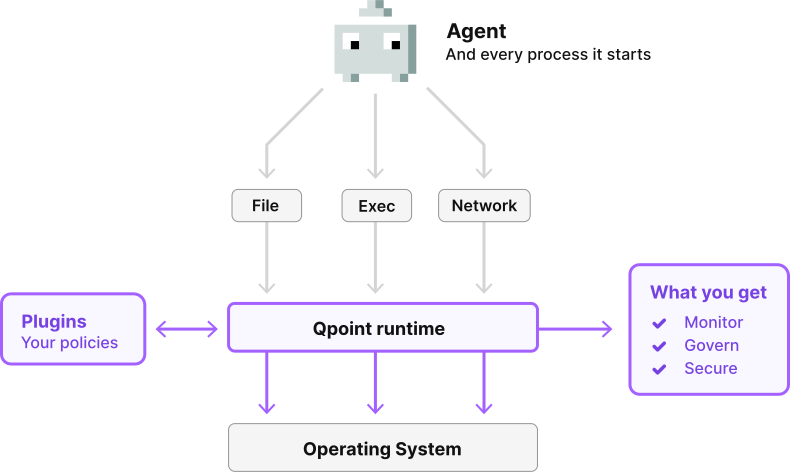
The runtime turns each action into a simple event, like a file read, a command, or a request, with the path or host, the process, the agent, and the session attached. The events look the same on macOS, Windows, and Linux, so the same plugins work everywhere. This single runtime is what lets Qpoint monitor, govern, and secure agents.
For monitoring, events are sent asynchronously, so the agent never waits on them. For enforcement, a plugin decides what happens before a given action completes. Plugins have many enforcement options:
- Allow it.
- Deny it. If the agent tries to read
~/.ssh/id_ed25519, it gets a normal file-not-found error and moves on, or asks the user for what it needed. - Redirect it. Instead of this file, open that one.
- Change the content. Let the agent read the
.envfile, but replace every value with a placeholder. It still sees the shape of the config and can do its job. - Rewrite outbound requests. For example, strip an API key out of a prompt before it goes to api.anthropic.com.
The agent is unaware that any of this is happening, and continues to run as it normally would.
Judging intent, not just access
Now take a fleet of agents. Say a thousand Claude Code instances running on Linux servers or developer laptops.
Every action is first checked against the existing ruleset, and most of what the agents do is already covered. But some actions can’t be decided by an access rule. Take a read of ~/.aws/credentials. If the agent is fixing a deploy and needs the profile name, that read might be fine. If it just read a README with hidden instructions and its next step is a connection to an unknown IP, it isn’t. The file read is identical, so an access list has to treat both the same. The difference is the agent’s intent.
Dynamically enforced policies can be written in plain language, like “agents can read from internal APIs but can’t send credentials or customer data to third parties.” When an action needs a judgment call, the plugin asks an AI judge to check it against that policy, taking into account the agent’s assigned task and the actions it has already taken in the session. The AI judge is consulted only for actions that are not covered by the existing ruleset. If the judge’s decision doesn’t depend on session context, it’s saved as a new rule. The next time any agent in the fleet takes the same action, it’s handled by a rule check with no model call.
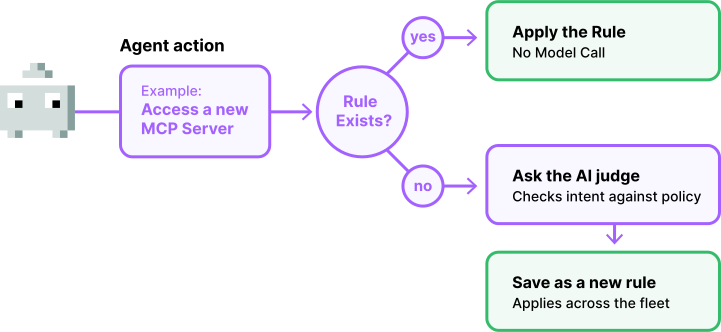
The result is a ruleset that grows with your agents. Your security team writes policies in plain language, and the sandbox applies them to every new action. Agents that decide their own actions at runtime can’t be secured with a hand-written access list. It takes an AI judge in the decision path, evaluating the agent’s intent.
How Qpoint can do this
Before AI agents went mainstream, we spent two years using eBPF to map sensitive data flows at the source in Linux production environments.
Then agents took off, and we started getting the same question from every direction: can you see what an agent is doing on the endpoint? Endpoints mostly run macOS and Windows, not Linux, so eBPF was out. Operations and security teams wanted visibility into and control over the AI agents running in their environments.
So we ran an experiment to see if we could get the same visibility and control without eBPF. Long story short, it worked.
What we built is a layered approach that uses several techniques which vary by operating system. It combines native OS and kernel capabilities with our own technology, which reads an application’s binary and isolates the code paths it uses for file, exec, and network I/O. The result is the same on every platform: one runtime, the same events, and the same plugins.
We also built it so plugins run outside the agent’s process. If a plugin fails, the agent is isolated from the failure.
Where Qpoint runs
Endpoints: developer laptops on macOS, Windows, and Linux, deployed through your existing MDM, such as Jamf or Intune.
Hosted agents: containers, VMs, Kubernetes, and CI runners. On Kubernetes, agents are deployed with labels, and the Qpoint spec defines which agents to watch and how to tap into them.
Embedded: shipped as a shared library inside another vendor’s agent or sensor. This is how a large security vendor is integrating Qpoint today.
All three use the same plugins and the same set of events.
Security that keeps up with your agents
AI agents don’t follow a script. They interpret their context, decide on their next action at runtime, and try a different approach when one is blocked. A sandbox built on static rules will always be one step behind.
A dynamic sandbox works at the same speed as the agent. It sees every file, command, and network request, including the ones that come from a script the agent wrote a turn earlier. It allows, denies, redirects, or rewrites each action before it completes, and it works the same for every harness. And when you need more than an access list, it can judge intent too.
What’s next
This is the first post in a series on securing AI agents. Next, we’ll examine the hidden surface: the actions agents take through the scripts and processes they spawn, and why most security tools never see them. After that, we’ll make the case for treating agents as insiders, subject to the same controls you’d apply to any person with access to your systems.
Qpoint can monitor, govern, and secure agents on employee laptops, in your hosted infrastructure, and inside the products you build.
Book a demo to see a dynamic sandbox in action in your environment.