Beyond the Tool CallThe Hidden Agent Surface
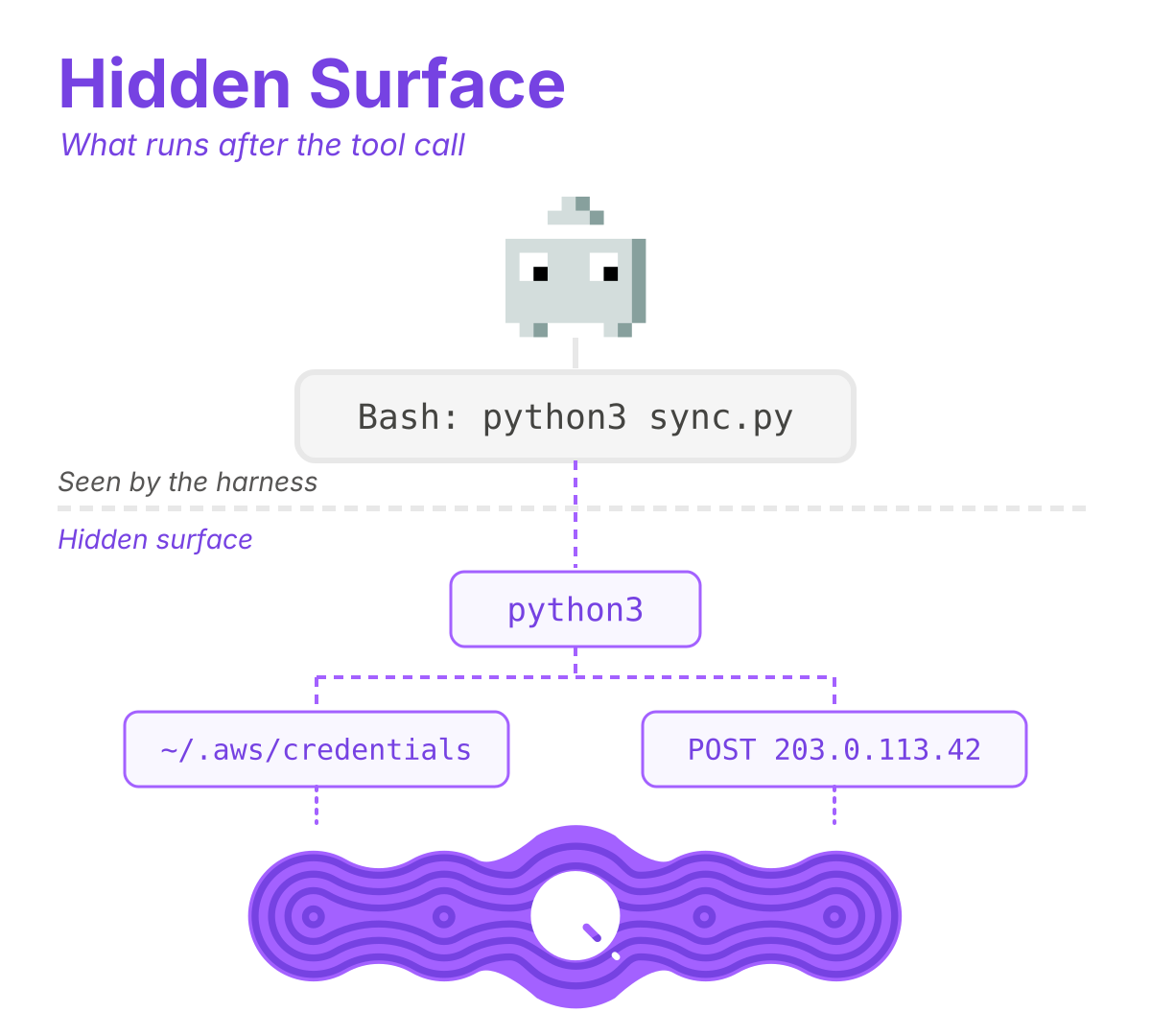
Most approaches to agent security start and stop at the tool call. A tool call is an explicit request from the agent to the harness: read this file, run this command, call this MCP tool, with the arguments spelled out.
The tool call ends when the command starts. When an agent writes a script and runs it, everything the script does after that, including the files it opens, the connections it makes, and the processes it starts, happens outside the tool call. The harness records that the agent ran python3 sync.py. It has no record of the files sync.py opened or the hosts it connected to.
If your stack only watches tool calls, it misses all of that. We call this the hidden agent surface. It’s where most of an agent’s real work happens: the files it changes, the services it calls, and the data it sends, whether that’s intended, a mistake, or an attack.
Where the hidden surface comes from
The hidden surface is everything an agent does through the processes that it starts, not through its own tool calls. Here are a few examples:
- Scripts. The agent writes a Python script and then executes it. Every request and file open shows up as python3, not the agent.
- Sub-agents. An orchestrator starts a sub-agent, which starts its own shells and processes.
- MCP servers over stdio. These run as child processes of the harness, with their own file and network access.
None of this is unusual. It’s how agents get work done. It’s also where an injected instruction or a bad call turns into an action.
Why every layer misses it
Harness hooks and permissions see the tool call, like Bash: python3 sync.py. They do not see that sync.py opened a credentials file and posted it somewhere.
The agent’s own logs sit in a local directory controlled by the developer. They will show a Bash tool call from the command line. They won’t show the file reads or network requests that came from the script.
EDR sees a process tree. It doesn’t know the tree started with a coding agent, or which prompt led to it.
Network controls and AI gateways see a connection to a host. They know which device made the request and where it went, but not that an agent was behind it.
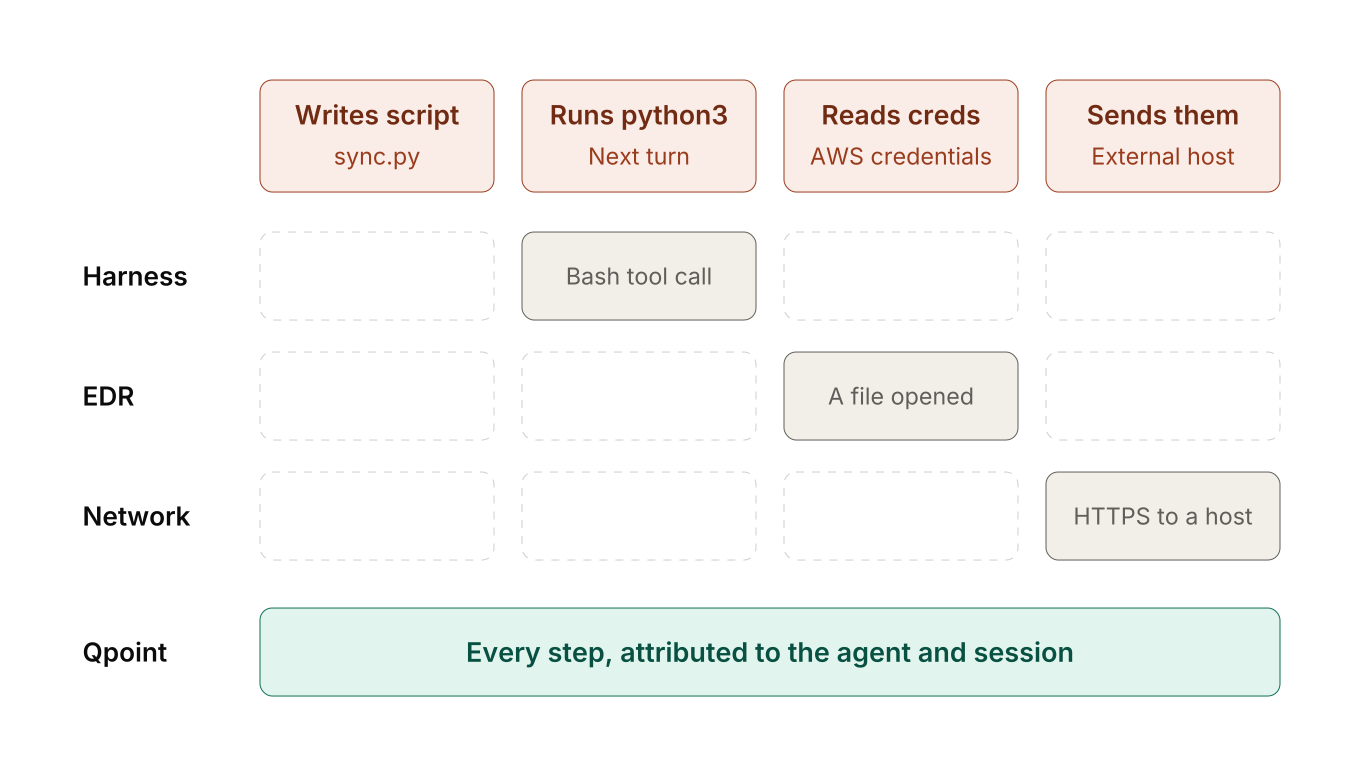
The harness sees the tool call, EDR sees the process, and the network sees the connection. None of them ties those together or back to the agent, the session, and the person who started it.
From a README to stolen credentials
A developer asks Claude Code to fix a failing deployment from their laptop. Along the way, the agent reads a package README that has instructions hidden in it.
On the next turn, the agent writes a short Python script. On the turn after that, it runs the script, which reads ~/.aws/credentials and posts the contents to an external host.
Here’s what each layer saw:
- The harness saw a Bash tool call.
- EDR saw python3 open a file.
- The network saw an HTTPS connection from the laptop.
None of these layers saw an agent sending credentials off the machine.
How Qpoint sees the hidden surface
Qpoint sits underneath the agent and above the operating system, as described in our dynamic sandbox post. When the Qpoint runtime monitors an agent, anything that happens in that process, or in a child of that process, counts as the same unit.
So when the agent runs python3, the Qpoint runtime sees it. When Python opens ~/.aws/credentials, it sees that too, and flags it as a sensitive file. When Python connects to an outside host, it sees the destination and the request. Every event carries the agent, session, user, and host, no matter how many processes deep it occurs. Sub-agents are recognized as agents in their own right and stay tied to the parent that started them.
The audit log is the proof
The audit log flattens all of this into one view. If an HTTP request happens, it doesn’t matter whether the agent made it or some nested script did. You just see an HTTP request from that agent session. We tested this internally against scripts, sub-agents, and stdio MCP servers. In every case, each action showed up in the log attributed to the right agent session.
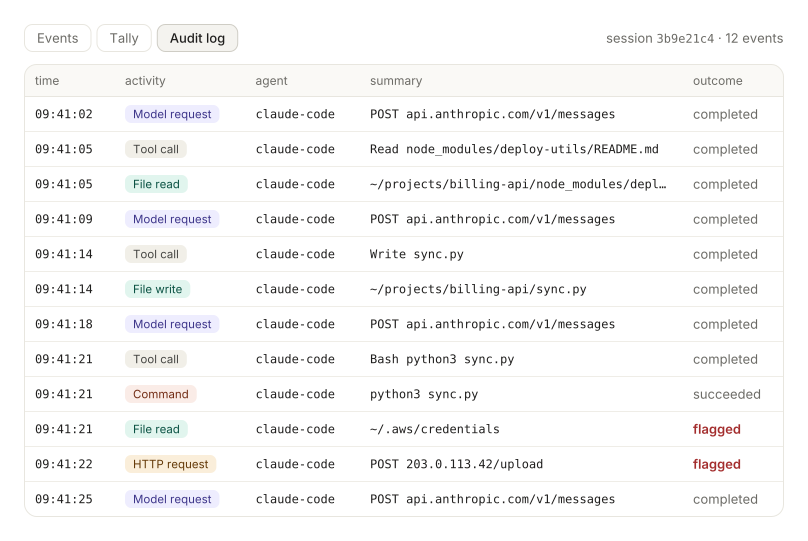
For this session, the log shows:
- Model requests: every call the agent made to api.anthropic.com, in sequence with the agent’s other actions.
- Tool calls: what the agent asked the harness to do: read the README, write
sync.py, run it with Bash. - File activity: the README read and the
sync.pywrite, with full paths. - The command: the python3 sync.py process that the Bash tool call launched.
- What the command did: python3 read
~/.aws/credentialsand posted to 203.0.113.42. Both are flagged.
Every row is attributed to the same agent, claude-code, in the order it happened. The last two rows didn’t come from a tool call, and nothing else in the stack would have tied them to the agent. See our Monitor page to learn more about session audit trails and process lineage.
Putting the hidden surface to work
Tool calls are only part of what an agent does. The rest happens in the code the agent writes and executes.
Once that surface is visible, the rest of your stack can use it. Every event goes to your SIEM with the agent, session, and user attached, so a single detection rule (“an agent reads a credential file, then connects to an unexpected host”) can alert your security team. Qpoint can also tag the traffic with the agent’s ID so your network controls can apply agent-specific rules. And because Qpoint is in the path, a policy can block the read or the request before it completes.
Whether your agents run on employee laptops, as hosted agents in your own infrastructure, or inside a product you’re building, we’d like to show you what Qpoint sees on your workloads.
Book a demo or request access to see Qpoint in action in your environment.